Mottle Game
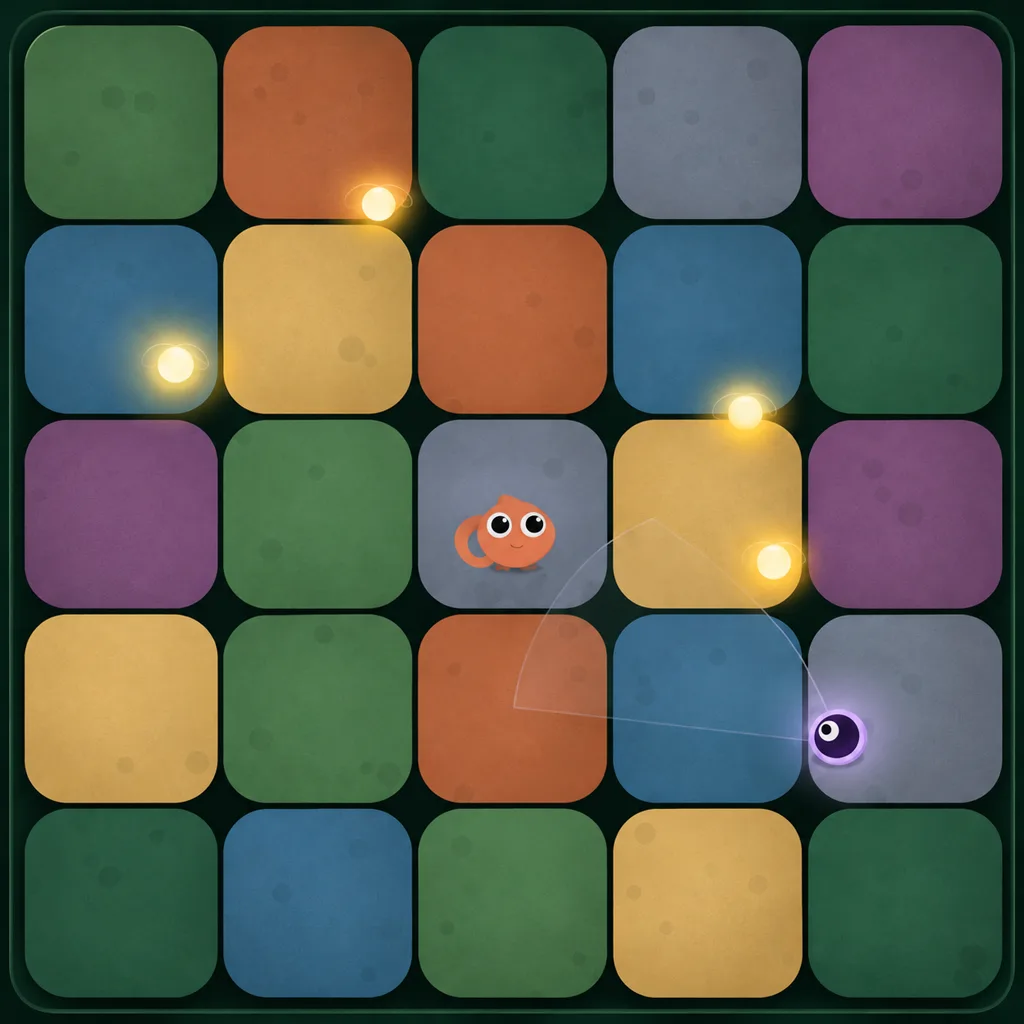
Mottle is a free browser hide-and-seek game by Star Lord. Drag to chase glowing Fireflies, release to match the color beneath you, and stay outside the Seekers’ sweeping light. Watch Camo and Alert as each round grows faster and tighter.
Last updated
What Is Mottle Game
Mottle — Hide & Seek is a real-time browser game by Star Lord, published on 8x.gg. You guide a small chameleon across a floor of shifting color patches. Collect the glowing Fireflies, then stop moving so your body can take on the color of the ground beneath you.
The top of the game screen tracks your score, lives and round. The Camo and Alert bars tell you what is happening between those numbers. Camo shows your blend with the ground. Alert tells you when exposure is becoming dangerous. You can learn the first round by watching those two bars while the Seekers sweep past.
The player above loads the original game from a third-party host.
What Does Mottle Mean?
To mottle something is to mark its surface with irregular spots, streaks or patches of color. A mottled surface can have several shades of one color or distinct colors side by side. As a noun, a mottle can be a patch of color or the uneven pattern those patches form.
Picture a pear with brown flecks on its yellow skin, or a piece of stone with dark patches running through pale gray. You might call either surface mottled. The patches can be tiny or broad, and their edges often look uneven. The word describes how the colors sit together on a surface.
In Mottle — Hide & Seek, the name fits the playfield and the way you hide on it. The floor gives you patches of different colors. While you move, the chameleon stands out. Once you let go, its body takes on the color under its feet. From a player’s point of view, the title captures the moment a moving figure becomes harder to pick out against a patchy floor. That reading comes from the game mechanic. The creator’s listing describes the color matching without explaining the choice of name.
Motel is a separate word. It means a place for motorists to stay, often with parking near the guest rooms. The game title is spelled M-o-t-t-l-e, with two t’s and a final l-e. Motel has one t and ends in e-l.
Is Mottle a Board Game?
It is not a board game. Mottle — Hide & Seek is a real-time game you play in a web browser. One player controls the chameleon with a mouse or touch input. The Seekers move during the round, and their beams can cross your path while you decide where to stop.
The floor can look like a board because you see it from above. During an active search you can let a light pass, make a short run to a Firefly and stop again. The timing of the drag and release is the part to practice.
How to Play
Drag with your mouse or finger to move the chameleon. Release to stop and let Camo build. For your first round, try one nearby Firefly and pick where you want to stop before you move. Use the beam nearest your intended path to decide when to go.
- Look during Hide. Use the opening countdown to locate your chameleon, the nearest glowing Firefly and a place to stop.
- Watch the beam sweep. Follow the direction of the nearest cone, especially where it cuts across your intended path.
- Drag through the Firefly. Guide your character through the glow to collect it. Check the Score display after contact.
- Release on the next patch. Let go, watch Camo climb, and use Alert to decide how urgently you need to move.
- Read the next round. Use each new Hide countdown to choose a fresh route. The original listing describes later rounds as faster.
Controls
Movement and camouflage use the same input. Hold and drag to steer. Release the mouse button or lift your finger when you reach a hiding spot. Keep the gesture inside the game area on a small screen so you can stop exactly where you mean to.
- Mouse
- Hold and drag in the game area to move.
- Touch
- Drag one finger inside the game area.
- Release
- Stop the chameleon and let its color blend.
- Pause
- Use the game’s pause control. Esc did not pause in our desktop test.
- Sound
- Use the game’s sound control to mute or unmute.
Mechanics
The game gives you a reason to leave cover and a way to judge the risk. Fireflies add points, Camo shows the effect of standing still, and Seekers sweep the floor with light. Keep an eye on Alert when a beam crosses the chameleon’s position.
Firefly
A Firefly is a glow you can collect by passing your chameleon through it. One isolated pickup in Round 1 raised Score from 0 to 10. Survival scores separately. In the stationary test, clearing Round 1 took Score from 0 to 100 without a pickup.
Camo
Camo indicates how far the chameleon has blended into the color directly underneath it. While dragging in Seek, we saw Camo drop to 0%. Release the drag and use the bar to see the change. Leave time for the color to settle before the next sweep.
Seekers
Seekers sweep the map with visible light cones. When we moved into danger, the Alert meter rose, reached 100% and we lost a life. The round restarted from Hide with fewer hearts. Use the cone’s direction to plan your route and check Alert when the light gets close.
Tips
Plan each pickup around the next place you can stop. Take the easiest Fireflies first, then try crossing open ground when the beams leave you a clear window. These are practice suggestions based on the browser game.
- Start close. Take a nearby Firefly before deciding if a second one fits the same opening.
- Pick the stop first. Aim for a patch you can reach before the beam passes back.
- Use short moves. Break a wide crossing into legs if the next sweep is hard to read.
- Reset your eyes. After each pickup, find the nearest cone again before dragging toward the next glow.
- Read both bars. Camo tells you about the blend. Alert tells you how close you are to losing a life.
- Log the finish. Write down your score, round and the move that ended the run. Change one thing on the next attempt.
Download & Unblocked
Mottle — Hide & Seek is available as a free browser game. Open the player above or visit the original 8x.gg listing. The game runs in the browser, and this site supplies no standalone installer, APK or offline edition.
If the embedded view stalls, give the original listing a try. Access on a school, workplace or other managed network depends on the rules set by its administrator. Ask them about access if the host is restricted. On a phone, use the original web player if the game area here is too small for a comfortable drag.
FAQ
Is Mottle Game free to play?
Yes. The creator’s 8x.gg listing marks Mottle — Hide & Seek as free. You can play from the browser.
Who made Mottle — Hide & Seek?
Star Lord created the game. The primary source for the game and its creator credit is the original 8x.gg listing.
Is mottlegame.cc the official site?
Mottlegame.cc is an independent player guide. Star Lord’s original game is published on 8x.gg.
Can I play Mottle on a phone?
The browser game uses a drag gesture. Start in the browser, drag with one finger and lift it to stop and blend.
How do I camouflage in Mottle?
Release your drag and stay still. The chameleon starts matching the ground beneath it, and the Camo meter shows the change.
What do Fireflies do?
Fireflies award points on contact. A single Firefly raised Score from 0 to 10 in our Round 1 test.
What happens when Alert fills?
Full Alert triggers a catch and costs a life. If you have lives left, the same round restarts. The last catch opens the Caught Out results screen.
What is the difference between mottle and motel?
Mottle describes marking a surface with uneven color. A motel is a place for motorists to stay.
Is there a Mottle Game APK?
This site distributes no APK. The route verified for this guide is the original game in a web browser.
What if Mottle will not load here?
Try reloading the player or open the original 8x.gg listing. Access depends on the game host and your network’s rules.